


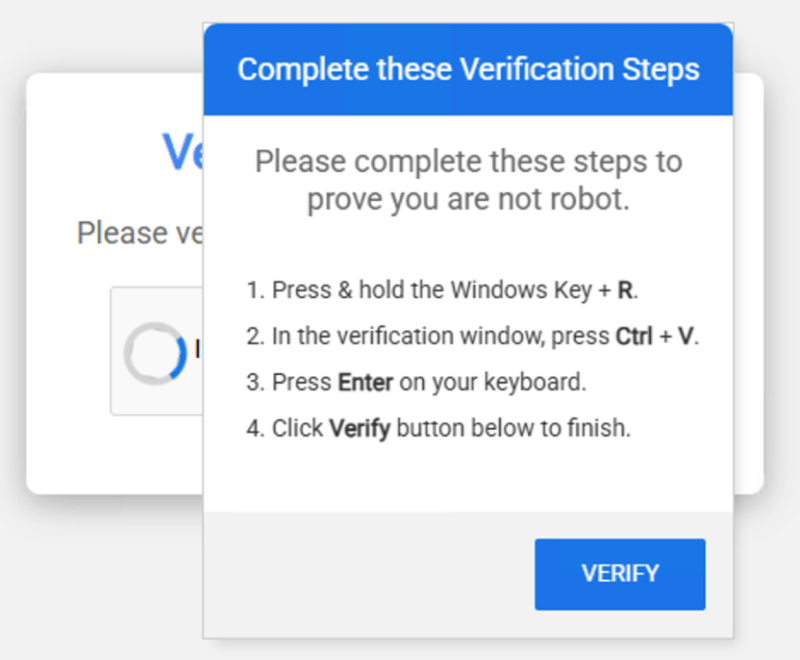
 From “Don’t Click” to “Don’t Paste”: The Rise of ClickFix Scams
As security awareness professionals, we have spent years teaching employees to be wary of suspicious email attachments and unknown downloads. However, a dangerous new trend is bypassing these traditional defenses by turning the user into the primary vector of infection. The “ClickFix” or “Fix or Update” scam doesn’t rely on a file download; it relies on social engineering to trick users into manually executing malicious code.
How the Trap is Set
Instead of a direct download, these malicious sites present familiar-looking hurdles: a fake CAPTCHA, a “Cloudflare” verification screen, or even a phony Microsoft Word error. When the user tries to “verify” or “fix” the issue, they are given a set of instructions: Press Windows + R, paste this string, and hit Enter. By doing this, the user is effectively bypassing the browser’s security sandbox and handing the keys to their system directly to the attacker. This method is particularly effective because it feels like a standard troubleshooting step rather than a malware attack.
Guidance to Encourage Among Employees
To combat this “manual” infection method, awareness programs should prioritize the following behavioral changes:
-
The “Never Paste” Rule: This should be a non-negotiable cornerstone of your training. Legitimate websites, tech support, and verification services will never ask a user to copy and paste code into their Run box, Command Prompt, or Terminal.
-
Identify the “Out-of-Browser” Pivot: Teach employees that as soon as a website asks them to interact with their operating system (like opening the Run box), it is a massive red flag. Troubleshooting for a webpage should happen inside the webpage, not in the OS.
-
Beware of “Familiar” Hurdles: Scammers are weaponizing the trust we have in services like Cloudflare or CAPTCHA. Remind your team that even a professional-looking “I’m not a robot” check can be a front for a malicious command.
-
Biometric & Physical Safety Nets: Reinforce the use of hardware security keys or biometric MFA. While these scams aim to steal credentials and install persistence, robust MFA remains a critical layer of defense if a user’s local system is compromised.
-
Report the Weird: Encourage a “no-blame” culture where employees feel comfortable reporting if they accidentally ran a command. Early detection of these PowerShell-based scripts is vital for containing the “blast radius” of the infection.
By evolving our training to address these “interaction-required” threats, we help our employees see past the visual polish of modern scams and recognize the underlying malicious intent.
 | Read the full breakdown on how to spot and stop these pop-up scams here:Beware of Pop-Ups for Verification, Fixes or Updates |

No responses yet